Defining Tools with MCP
Building an MCP server is simple when you use the official Python SDK. Instead of writing complex JSON schemas by hand, you can define tools with decorators and let the SDK handle the heavy lifting.
Example: Creating a document management server with two core tools: one to read documents and another to update them.
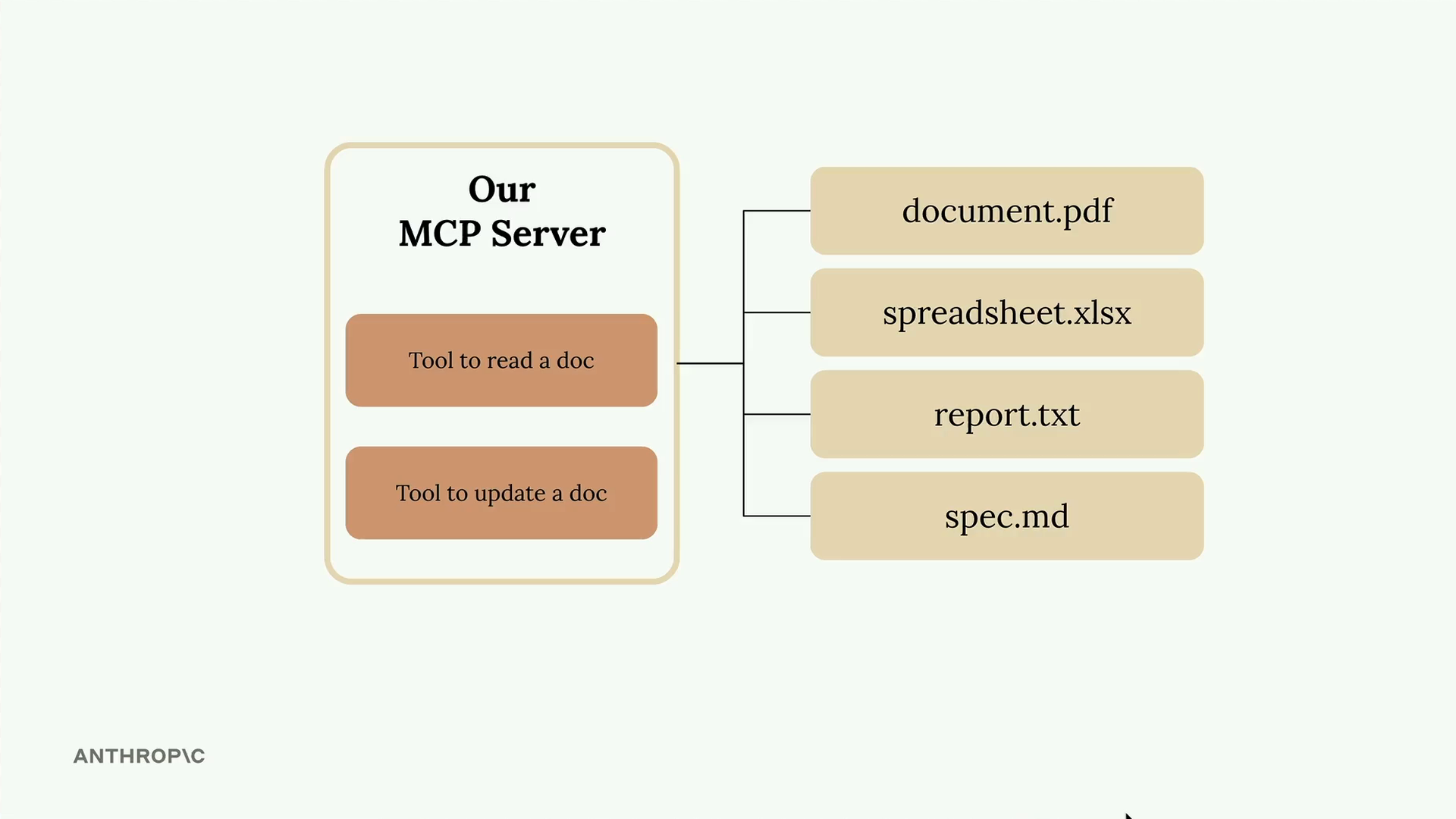
All documents exist in memory as a simple dictionary where keys are document IDs and values are the content.
docs = {
    "deposition.md": "This deposition covers the testimony of Angela Smith, P.E.",
    "report.pdf": "The report details the state of a 20m condenser tower.",
    "financials.docx": "These financials outline the project's budget and expenditures",
    "outlook.pdf": "This document presents the projected future performance of the system",
    "plan.md": "The plan outlines the steps for the project's implementation.",
    "spec.txt": "These specifications define the technical requirements for the equipment"
}
Setting Up the MCP Server
The Python MCP SDK makes server creation straightforward. You can initialize a server with just one line:
from mcp.server.fastmcp import FastMCP

mcp = FastMCP("DocumentMCP", log_level="ERROR")
Tool Definition with Decorators
The SDK uses decorators to define tools.
Instead of writing JSON schemas manually, you can use Python type hints and field descriptions. The SDK automatically generates the proper schema that Claude can understand.
Creating a document reader tool
Reads document contents by ID.
@mcp.tool(
    name="read_doc_contents",
    description="Read the contents of a document and return it as a string."
)
def read_document(
    doc_id: str = Field(description="Id of the document to read")
):
    if doc_id not in docs:
        raise ValueError(f"Doc with id {doc_id} not found")

    return docs[doc_id]
- The decorator specifies the tool name and description.
- The function parameters define the required arguments.
- The
Fieldclass from Pydantic provides argument descriptions that help Claude understand what each parameter expects.
Explain in detail
What happens when you decorate a function
- Registration. FastMCP adds the function to the server’s tool list. When a client sends
tools/list, this tool is in the reply. - Schema generation. FastMCP reads the function’s signature and builds a JSON Schema for the inputs:
- The type hints (
doc_id: str) set the parameter types. - The
Field(description=...)text becomes each parameter’s description, which tells the model what to pass. - A parameter with no default is marked required.
- The type hints (
- Metadata.
name=is the tool name clients see (read_doc_contents). It can differ from the Python function name (read_document). If you leave it out, the function name is used.description=tells the model when to use the tool. If you leave it out, the docstring is used.
- Dispatch. When a client sends
tools/callwith{"name": "read_doc_contents", "arguments": {"doc_id": "plan.md"}}, FastMCP:- checks the arguments against the schema (with pydantic)
- calls your function
- wraps the return value as the tool result (a string becomes text content)
- turns a raised exception (such as your
ValueError) into an error result instead of crashing the server
In short
@mcp.tool(name="read_doc_contents", description="...")
def read_document(doc_id: str = Field(description="...")): ...
This roughly means: “expose read_document to clients as read_doc_contents, which takes a required string doc_id.”
Building a document editor tool
Performs simple find-and-replace operations on documents:
@mcp.tool(
    name="edit_document",
    description="Edit a document by replacing a string in the documents content with a new string."
)
def edit_document(
    doc_id: str = Field(description="Id of the document that will be edited"),
    old_str: str = Field(description="The text to replace. Must match exactly, including whitespace."),
    new_str: str = Field(description="The new text to insert in place of the old text.")
):
    if doc_id not in docs:
        raise ValueError(f"Doc with id {doc_id} not found")

    docs[doc_id] = docs[doc_id].replace(old_str, new_str)
Putting together
from mcp.server.fastmcp import FastMCP
from pydantic import Field

# Create the MCP server
mcp = FastMCP("DocumentMCP", log_level="ERROR")

docs = {
    "deposition.md": "This deposition covers the testimony of Angela Smith, P.E.",
    "report.pdf": "The report details the state of a 20m condenser tower.",
    "financials.docx": "These financials outline the project's budget and expenditures.",
    "outlook.pdf": "This document presents the projected future performance of the system.",
    "plan.md": "The plan outlines the steps for the project's implementation.",
    "spec.txt": "These specifications define the technical requirements for the equipment.",
}


# Tool Definition with Decorators:
# The SDK uses decorators to define tools.
# Instead of writing JSON schemas manually, you can use Python type hints and field descriptions.
# The SDK automatically generates the proper schema that Claude can understand.
@mcp.tool(
    name="read_doc_contents",
    description="Read the contents of a document and return it as a string.",
)
def read_document(
    doc_id: str = Field(description="Id of the document to read"),
):
    if doc_id not in docs:
        raise ValueError(f"Doc with id {doc_id} not found")
    return docs[doc_id]


@mcp.tool(
    name="edit_document",
    description="Edit a document by replacing a string in the documents content with a new string.",
)
def edit_document(
    doc_id: str = Field(description="Id of the document that will be edited"),
    old_str: str = Field(description="The text to replace. Must match exactly, including whitespace."),
    new_str: str = Field(description="The new text to insert in place of the old text."),
):
    if doc_id not in docs:
        raise ValueError(f"Doc with id {doc_id} not found")
    docs[doc_id] = docs[doc_id].replace(old_str, new_str)


if __name__ == "__main__":
    mcp.run(transport="stdio")
Key Benefits of the SDK Approach
The MCP Python SDK transforms tool creation from a complex schema-writing exercise into simple Python function definitions.
- No manual JSON schema writing required
- Type hints provide automatic validation
- Clear parameter descriptions help Claude understand tool usage
- Error handling integrates naturally with Python exceptions
- Tool registration happens automatically through decorators
This approach makes it much easier to build and maintain MCP servers while ensuring Claude receives properly formatted tool specifications.