Dockerfile
TL;DR
What is Dockerfile?
A Dockerfile is a text file that defines a Docker image. You’ll use a Dockerfile to create your own custom Docker image, in other words to define your custom environment to be used in a Docker container.
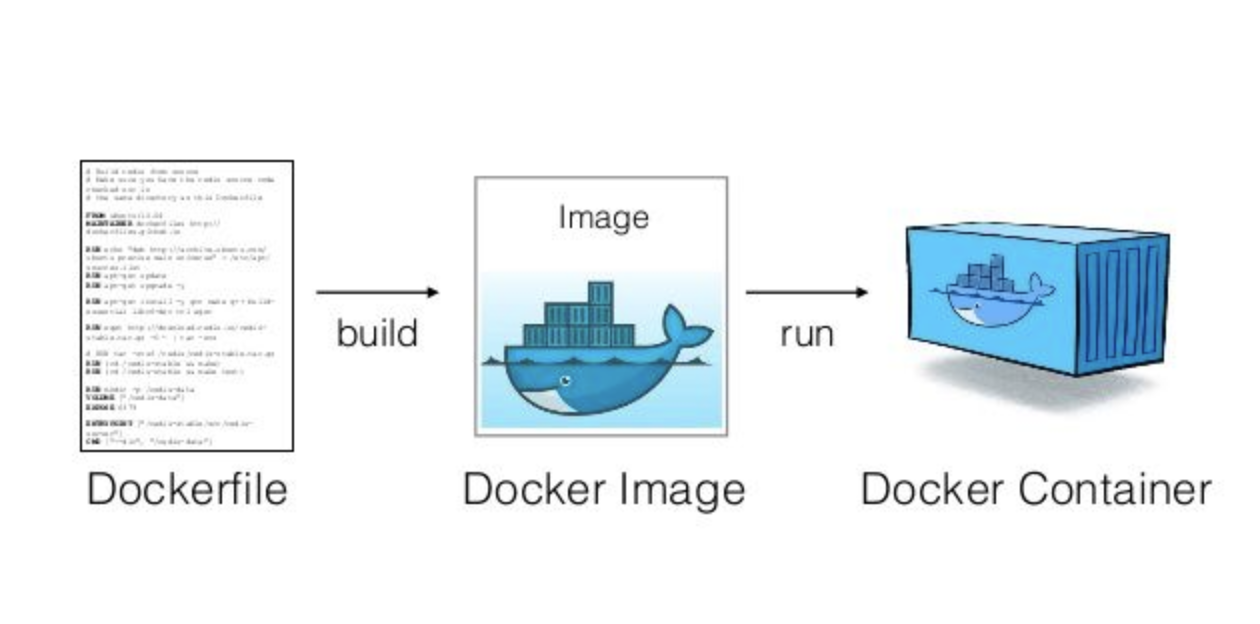
A Dockerfile is a step by step definition of building up a Docker image. The Dockerfile contains a list of instructions that Docker will execute when you issue the docker build command. Your workflow is like this:
- Create the Dockerfile and define the steps that build up your images
- Issue the
docker buildcommand which will build a Docker image from your Dockerfile - Use this image to start containers with the
docker runcommand
Dockerfile commands
FROM
The
FROMinstruction initializes a new build stage and sets the Base Image for subsequent instructions.As such, a valid
Dockerfilemust start with aFROMinstruction.- Note:
ARGis the only instruction that may precedeFROMin theDockerfile.
- Note:
The image can be any valid image – it is especially easy to start by pulling an image from the Public Repositories.
Syntax:
FROM [--platform=<platform>] <image>[:<tag>] [AS <name>]Example:
FROM ubuntu:18.04
RUN
Execute a command in a shell or exec form.
The RUN instruction adds a new layer on top of the newly created image.
The committed results are then used for the next instruction in the DockerFile.
Syntax
Shell form (the command is run in a shell, which by default is
/bin/sh -con Linux)RUN <command>In the shell form you can use a
\(backslash) to continue a single RUN instruction onto the next line.E.g.
RUN /bin/bash -c 'source $HOME/.bashrc; \
echo $HOME'
Together they are equivalent to this single line:
RUN /bin/bash -c 'source $HOME/.bashrc; echo $HOME'Exec form
RUN ["executable", "param1", "param2"]E.g.
RUN ["/bin/bash", "-c", "echo hello"]
CMD
Give the default commands when the image is instantiated, it doesn’t execute while build stage.
The
CMDinstruction has three forms:CMD ["executable","param1","param2"](exec form, this is the preferred form)- It will NOT involke a command shell. This means that normal shell processing does NOT happen.
E.g
CMD ["echo","hello", "world"]CMD ["param1","param2"](as default parameters to ENTRYPOINT)- If you would like your container to run the same executable every time, then you should consider using
ENTRYPOINTin combination withCMD. See ENTRYPOINT.
- If you would like your container to run the same executable every time, then you should consider using
CMD command param1 param2(shell form)The
<command>will execute in/bin/sh -c.E.g.
CMD echo $HWIt will execute the command
/bin/sh -c echo $HW
There can only be ONE
CMDinstruction in aDockerfile. If you list more than oneCMDthen only the lastCMDwill take effect.The main purpose of a
CMDis to provide defaults for an executing container. These defaults can include- an executable, or
- they can omit the executable, in which case you must specify an
ENTRYPOINTinstruction as well.
docker run then they will override the default specified in CMD.ENTRYPOINT
Configures a container that will run as an executable. I.e., a specific application can be set as default and run every time a container is created using the image.
ENTRYPOINThas two forms:exec form (the preferred form)
ENTRYPOINT ["executable", "param1", "param2"]shell form:
ENTRYPOINT command param1 param2
Unlike
CMD, command line arguments todocker run <image>will NOT override the default specified inCMD. Instead, they will be appended after all elements in an exec formENTRYPOINT, and will override all elements specified usingCMD.Only the last
ENTRYPOINTinstruction in theDockerfilewill have an effect.You can override the
ENTRYPOINTinstruction using thedocker run --entrypointflag.
Understand how CMD and ENTRYPOINT interact
Both CMD and ENTRYPOINT instructions define what command gets executed when running a container. There are few rules that describe their co-operation.
- Dockerfile should specify at least one of
CMDorENTRYPOINTcommands. ENTRYPOINTshould be defined when using the container as an executable.CMDshould be used as a way of defining default arguments for anENTRYPOINTcommand or for executing an ad-hoc command in a container.CMDwill be overridden when running the container with alternative arguments.
The table below shows what command is executed for different ENTRYPOINT / CMD combinations:
| No ENTRYPOINT | ENTRYPOINT exec_entry p1_entry | ENTRYPOINT [“exec_entry”, “p1_entry”] | |
|---|---|---|---|
| No CMD | error, not allowed | /bin/sh -c exec_entry p1_entry | exec_entry p1_entry |
| CMD [“exec_cmd”, “p1_cmd”] | exec_cmd p1_cmd | /bin/sh -c exec_entry p1_entry | exec_entry p1_entry exec_cmd p1_cmd |
| CMD [“p1_cmd”, “p2_cmd”] | p1_cmd p2_cmd | /bin/sh -c exec_entry p1_entry | exec_entry p1_entry p1_cmd p2_cmd |
| CMD exec_cmd p1_cmd | /bin/sh -c exec_cmd p1_cmd | /bin/sh -c exec_entry p1_entry | exec_entry p1_entry /bin/sh -c exec_cmd p1_cmd |
A common use case is: the executable is defined with ENTRYPOINT, while CMD specifies the default parameter.
Example:
Dockerfile
FROM node:8.11-slim

CMD ["world"]

ENTRYPOINT ["echo", "Hello"]
Build image:
docker built -t my-docker-image .
Run container:
without argument
docker run -it my-docker-imageoutput:
Hello worldIf we run
docker runwithout argument, the default argumentworlddefined inCMDwill be used. I.e, the commandecho Hello Worldwill be executed.with argument
docker run -it my-docker-image James Bondoutput:
Hello James BondIf we specify arguments when running
docker run,CMDwill be overriden by our given arguments. In our case,CMD ["World"]is overriden toCMD ["James", "Bond"]and then applied toecho. Thus, the commandecho Hello James Bondwill be executed.
Summary of
CMDandENTRYPOINTsee: Docker CMD Vs Entrypoint Commands: What’s The Difference?
EXPOSE
Specify the port on which the container will be listening at runtime by running the EXPOSE instruction.
Syntax
EXPOSE <port>
ENV
Set environment variables using the ENV instruction.
This value will be in the environment for all subsequent instructions in the build stage and can be replaced inline in many as well.
They come as key value pairs and increases the flexibility of running programs.
Syntax
ENV <key>=<value> ...e.g.
ENV PATH=usr/nodeor
ENV <key> <value>e.g.
ENV PATH usr/node
ADD
ADDhas two forms:ADD [--chown=<user>:<group>] <src>... <dest>or
ADD [--chown=<user>:<group>] ["<src>",... "<dest>"]Copies new files, directories or remote file URLs from
<src>and adds them to the filesystem of the image at the path<dest>.Invalidates caches. Avoid
ADDand useCOPYinstead.
COPY
Syntax
COPY [--chown=<user>:<group>] <src>... <dest>or
COPY [--chown=<user>:<group>] ["<src>",... "<dest>"]Copy new files or directories from
<src>and adds them to the filesystem of the container at the path<dest>.- Each
<src>may contain wildcards and matching will be done using Go’s filepath.Match rules.COPYobeys the following rules:
- Each
Example: copy
test.txtto<WORKDIR>/relativeDir/:COPY test.txt relativeDir/COPYobeys the following rules:The
<src>path must be inside the context of the buildIf
<src>is a directory, the entire contents of the directory are copied, including filesystem metadata.(The directory itself is not copied, just its contents.)
If
<src>is any other kind of file, it is copied individually along with its metadata. In this case, if<dest>ends with a trailing slash/, it will be considered a directory and the contents of<src>will be written at<dest>/base(<src>).If multiple
<src>resources are specified, either directly or due to the use of a wildcard, then<dest>must be a directory, and it must end with a slash/.If
<dest>does not end with a trailing slash, it will be considered a regular file and the contents of<src>will be written at<dest>.If
<dest>doesn’t exist, it is created along with all missing directories in its path.
VOLUMN
- Creates a mount point for externally mounted volumes or other containers
WORKDIR
Sets the working directory for any
RUN,CMD,ENTRYPOINT,COPYandADDinstructions that follow it in theDockerfile.The
WORKDIRinstruction can be used multiple times in aDockerfile. If a relative path is provided, it will be relative to the path of the previousWORKDIRinstruction. E.g.WORKDIR /usr/node WORKDIR appThe resulted work directory will be
/usr/mode/appThe
WORKDIRinstruction can resolve environment variables previously set usingENV. E.g.ENV WORK_DIR=/usr/node/app WORKDIR ${WORK_DIR}
ARG
Defines a build-time variable
Syntax
ARG <name>[=<default value>]ARGis the only instruction that can occur before theFROM.E.g. we can use
ARGto specify the version of base imageARG NODE_VERSION=8.11-slim FROM node:${NODE_VERSION}
ONBUILD
- Adds a trigger instruction when the image is used as the base for another build
STOPSIGNAL
- Sets the system call signal that will be sent to the container to exit.
LABEL
Add key/value metadata to your images, containers, or daemons.
Syntax
LABEL <key>=<value> <key>=<value> <key>=<value> ...Example
LABEL version="1.0"
LABEL description="Just a demo"
If a label already exists but with a different value, the most-recently-applied value overrides any previously-set value.
To view an image’s labels, use the
docker image inspectcommand. You can use the--formatoption to show just the labelsdocker image inspect --format='' <image>
SHELL
- Override default shell is used by docker to run commands.
HEALTHCHECK
- Tells docker how to test a container to check that it is still working.
Example with common commands
# ARG is used to pass some arguments to consecutive instructions
# this is only command other than a comment can be used before FROM.
ARG NODE_VERSION=8.11-slim

# from base image node
FROM node:${NODE_VERSION}

# LABEL add metadata to your images, containers, or daemons
LABEL "about"="This file is just an example to demostrate the basic usage of dockerfile commands"

# ENV sets the environment variables for the subsequent instructions in the build stage
ENV WORK_DIR /usr/node

# WORKDIR sets the working directory for all the consecutive commands.
# We can have multiple WORKDIR commands and will be appended with a relative path.
# E.g. we have two WORKDIR commands leads to /usr/node/app
WORKDIR ${WORK_DIR}
WORKDIR app

# VOLUME is used to create a mount point with the specified name
RUN mkdir /dockerexample
VOLUME /dockerexample

# COPY is used to copy files or directories
# from source host filesystem to a destination in the container file system.
# Here we're gonna copy package.json from our system to container file system
COPY package.json .

# RUN executes the instructions in a new layer on top of the existing image and commit those layers
# The resulted layer will be used for the next instructions in the Dockerfile
RUN ls -ll && \
    npm install

# USER instruction sets the user name and optionally the user group to use
# when running the image and for any instructions that follow it in the Dockerfile
RUN useradd ecko
USER ecko

# ADD is used to add files or directories and remote files
# from URL from source host filesystem to a destination in the container file system.
# Avoid ADD and use COPY instead!
ADD index.js .

# CMD command is used to give the default commands when the image is instantiated,
# it doesn’t execute while build stage.
# There should be only ONE CMD per Dockerfile,
# you can list multiple but the last one will be executed.
CMD ["echo", "Hello World"]

# EXPOSE informs Docker that
# the container listens on the specified network ports at runtime.
EXPOSE 3070

# ENTRYPOINT is used as an executable for the container.
# We can use ENTRYPOINT for executable command
# and use CMD command to pass some default commands to the executable.
ENTRYPOINT ["echo", "Hello"]
Reference
- Tutorials
- Reference: Dockerfile reference
- Cheatsheet